


The six best WooCommerce security plugins in 2026 are Wordfence Security, Sucuri Security, MalCare, Solid Security (formerly iThemes Security), All-In-One Security (AIOS), and Jetpack Security. Each offers a web application firewall, malware scanning, and brute force attack protection. Wordfence and Sucuri are the most widely deployed, with Sucuri providing a cloud-based WAF and Wordfence an endpoint firewall with real-time threat intelligence. For store owners who need one-click malware removal without technical knowledge, MalCare is the standout option. Free tiers exist for Wordfence, Sucuri, AIOS, and Solid Security, while MalCare and Jetpack Security are paid-only at entry level.
We know choosing a security plugin feels like picking a lock for your front door when you’re not a locksmith. The options pile up, the feature lists blur together, and meanwhile your store is taking payments right now. This guide cuts through that. We tested each plugin, mapped features against real WooCommerce threat scenarios, and priced everything out so you can make a clear decision today.

Why WooCommerce Security Plugins Are Essential for Your Store
WooCommerce powers approximately 33.4% of all tracked ecommerce sites globally, with 4.53 million active stores worldwide, according to Red Stag Fulfillment’s market share analysis. That scale makes WooCommerce a prime target.
The target on WooCommerce’s back is real and growing. The Patchstack State of WordPress Security report found 11,334 new vulnerabilities in the WordPress ecosystem in 2025, a 42% increase compared to 2024. Your store runs on WordPress. Every one of those vulnerabilities is a potential door in.
And the cost of walking through that door? According to IBM’s data breach report, the global average cost of a data breach was $4.44 million in 2025. That number applies to enterprises, but the reputational and operational damage hits small stores just as hard. A single breach can wipe out customer trust overnight.
A good WooCommerce security plugin doesn’t just block attacks. It watches your file system, filters malicious traffic through a firewall before it hits your server, scans for malware, and alerts you before a small problem becomes a full compromise. That’s the job. Without one, your store is genuinely exposed.
Common WooCommerce Security Threats You Need to Know
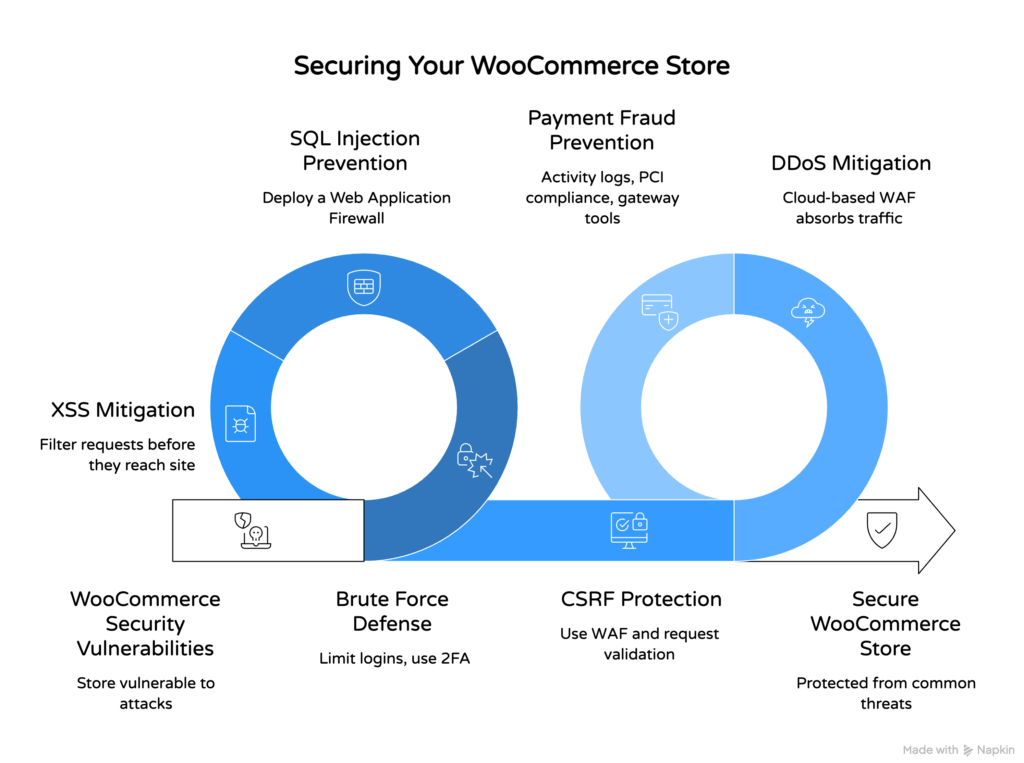
WooCommerce stores face six primary attack types: brute force login attacks, SQL injection, cross-site scripting (XSS), cross-site request forgery (CSRF), DDoS attacks, and payment fraud. Knowing what each one does helps you choose the right security plugin features.
Brute force attacks are the most common entry point. Bots hammer your login page with thousands of username and password combinations per minute. Login protection, two-factor authentication (2FA), and login attempt limiting stop most of them cold. This is table-stakes functionality for any security plugin you consider.
SQL injection and XSS attacks target your database and front-end code. A web application firewall (WAF) filters these requests before they reach your site. The difference between a good WAF and a basic one matters here: cloud-based WAFs like Sucuri’s filter traffic at the DNS level before it reaches your server, while endpoint firewalls like Wordfence’s filter at the WordPress level. Both work. Cloud-based WAF protection is faster for DDoS mitigation.
Payment fraud is a separate problem. Ecommerce fraud losses reached $48 billion globally in 2025. Security plugins help here through activity log monitoring and blocking suspicious IP ranges, but PCI compliance and your payment gateway’s fraud tools carry most of that weight. Don’t rely on a security plugin alone for payment fraud protection.

How We Tested and Evaluated These WooCommerce Security Plugins
We evaluated each security plugin across five criteria: firewall quality and WAF ruleset frequency, malware scanning depth and malware removal process, two-factor authentication options, brute force and login protection controls, and the ratio of useful free features to paid-only ones.
Pricing transparency mattered a lot in our scoring. Some plugins advertise a free tier that barely functions without an upgrade. Others front-load enough free capability that a small store can genuinely start protected without spending anything. We flagged both honestly below.
We also weighted ease of use. Most WooCommerce store owners aren’t developers. A security plugin that buries its most important settings six menus deep isn’t useful for the people who need it most. Accessible dashboards and clear alerts scored well. Confusing interfaces that create alert fatigue scored poorly, regardless of raw feature count.


Best WooCommerce Security Plugins at a Glance
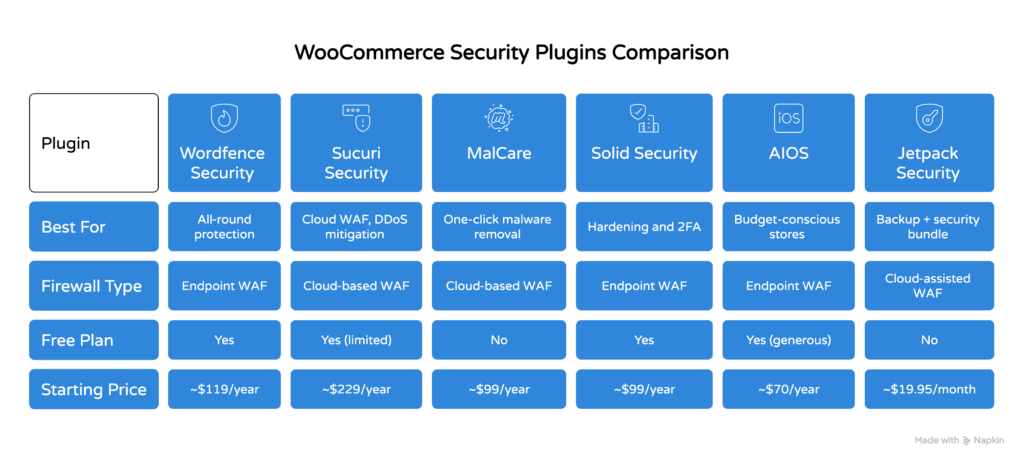
The table below compares all six plugins across key factors so you can orient quickly before reading the full reviews.
| Plugin | Best For | Firewall Type | Free Plan | Starting Paid Price |
|---|---|---|---|---|
| Wordfence Security | All-round protection, most stores | Endpoint WAF | Yes | ~$119/year |
| Sucuri Security | Cloud WAF, DDoS mitigation | Cloud-based WAF | Yes (limited) | ~$229/year |
| MalCare | One-click malware removal | Cloud-based WAF | No | ~$99/year |
| Solid Security (iThemes) | Hardening and 2FA | Endpoint WAF | Yes | ~$99/year |
| AIOS | Budget-conscious stores | Endpoint WAF | Yes (generous) | ~$70/year |
| Jetpack Security | Backup + security bundle | Cloud-assisted WAF | No | ~$19.95/month |
Prices above are approximate and based on single-site annual plans. Always check the plugin’s official website for current pricing before purchasing.
Top WooCommerce Security Plugins Reviewed
Each plugin below gets a full breakdown covering standout features, what it does well, where it falls short, and who it’s best suited for.
1. Wordfence Security
Wordfence is the most widely used WordPress security plugin, with a large active install base and a reputation built on its endpoint firewall and real-time malware scanning.
Its firewall operates at the WordPress application layer, meaning it can inspect traffic after it arrives at your server but before WordPress processes it. That’s not as fast as a cloud-based WAF for absorbing DDoS traffic, but it gives Wordfence deep visibility into what’s happening inside your WordPress environment. The malware scanning engine checks core files, themes, plugins, and WooCommerce-specific files against a known-clean signature database.
The free version of Wordfence includes the endpoint firewall, malware scanning, brute force attack protection, login attempt limiting, and two-factor authentication via authenticator apps. The free tier’s firewall rules are delayed by 30 days compared to the paid version, which gets real-time updates. For most small stores, that lag is acceptable. For stores processing high volumes, pay for Premium.
Pros: Strong free tier, excellent 2FA options, detailed activity logs, large threat intelligence network.
Cons: Endpoint firewall can slow server-side performance on budget hosting, free rules are 30 days behind.
Best for: Most WooCommerce store owners who want strong all-round protection at low or no cost.
2. Sucuri Security
Sucuri’s defining feature is its cloud-based web application firewall, which routes all traffic through Sucuri’s network before it reaches your WordPress server.
That architecture means DDoS attacks get absorbed at Sucuri’s infrastructure level, not yours. SQL injection and XSS attempts are blocked before they touch your database. The malware scanning in Sucuri’s free plugin checks your publicly accessible files, which is useful but less thorough than Wordfence’s server-side scan. The full malware removal service is only available on paid plans, but it includes a genuine human-assisted cleanup guarantee.
The free Sucuri plugin gives you activity log monitoring, file integrity monitoring, and post-hack security actions. The cloud-based WAF requires a paid subscription. That’s the honest trade-off: Sucuri’s free plugin is a monitoring tool, not a full firewall. If you want the cloud WAF, budget accordingly.
Pros: Best-in-class cloud WAF, unlimited malware removal on paid plans, CDN performance benefit.
Cons: Cloud WAF is paid-only, free tier has limited malware scanning depth.
Best for: Stores that need serious DDoS mitigation or have been hacked before.
3. MalCare
MalCare’s entire design philosophy centers on one thing: finding and removing malware without you needing to understand what it found.
Its cloud-based malware scanning runs offsite, which means the scan doesn’t slow down your store. The one-click malware removal is genuinely one click, not a guided process requiring technical decisions. That matters for non-technical store owners who discover an infection at 10pm on a Friday. MalCare also includes a WAF, login protection, brute force attack blocking, and 2FA. There is no meaningful free tier, but entry pricing is reasonable.
Pros: Offsite malware scanning, one-click cleanup, clean dashboard, minimal performance impact.
Cons: No free plan, fewer advanced hardening options than Wordfence or Solid Security.
Best for: Non-technical store owners who want automated malware removal without specialist knowledge.
4. Solid Security (formerly iThemes Security)
Solid Security, rebranded from iThemes Security, focuses heavily on WordPress hardening alongside its security plugin features.
Its two-factor authentication options are among the most flexible available, supporting authenticator apps, email codes, and backup codes. The brute force protection network is community-driven: when one site flags a malicious IP, Solid Security shares that data across all installs in its network. Login protection here benefits from that collective intelligence. The free version covers 2FA, brute force attack blocking, and a range of hardening controls. Paid tiers add vulnerability scanning, version management, and user security checks.
Pros: Excellent 2FA configuration, community-based brute force protection, solid hardening tools.
Cons: Interface can overwhelm beginners, malware scanning is basic compared to Wordfence or MalCare.
Best for: Stores where login security and WordPress hardening are the primary concern.
5. All-In-One Security (AIOS)
All-In-One Security offers one of the most generous free tiers among WooCommerce security plugins, covering firewall rules, login protection, brute force protection, and basic malware scanning at no cost.
The interface uses a security strength meter to show how protected your site is, which makes it approachable for beginners. AIOS covers XML-RPC protection, user account security, database prefix changes, and file permission checks. The 2FA feature is available on both free and paid plans. Where AIOS falls short is in malware scanning depth and real-time threat intelligence. It’s a capable security plugin for stores on tight budgets, but power users will hit its ceiling quickly.
Pros: Very generous free tier, beginner-friendly interface, covers most core security needs.
Cons: Malware scanning is surface-level, threat intelligence isn’t real-time.
Best for: New stores or budget-conscious owners who want solid baseline protection for free.
6. Jetpack Security
Jetpack Security bundles real-time backups, malware scanning, spam protection, and a WAF into one subscription, which makes it appealing for store owners who want fewer plugins to manage.
The real-time backup feature is genuinely valuable for WooCommerce stores. Orders, customer records, and product changes are saved continuously, not on a daily schedule. The malware scanning is powered by Automattic’s infrastructure. The WAF is cloud-assisted and updated automatically. The downside is cost: Jetpack Security is priced higher than standalone alternatives. If you already need a backup solution and a security plugin, the bundle pricing can work out well. If you already have backups covered, the cost math gets harder to justify.
Pros: Real-time backups included, automatic WAF updates, simple single-dashboard management.
Cons: More expensive than standalone options, less granular control over firewall rules.
Best for: Stores that want backups and security in one managed solution from a trusted provider.

Key Features to Look for in a WooCommerce Security Plugin
Five features separate a genuinely protective WooCommerce security plugin from one that mostly looks busy in your dashboard.
For a deeper look at how these features stack up across the broader WordPress security plugin category, our guide to choosing the best WordPress security plugins for your website covers the selection criteria in detail.
- Web Application Firewall (WAF): Blocks SQL injection, XSS, and brute force attempts before they reach your WordPress application. Cloud-based WAFs absorb more traffic volume. Endpoint WAFs have deeper WordPress integration.
- Malware scanning and malware removal: Scheduled scans catch infections early. One-click malware removal matters for non-technical owners. Offsite scanning avoids impacting store performance.
- Two-factor authentication (2FA): Adds a second verification step to logins. Authenticator app 2FA is more secure than email-based 2FA. Enforce it for admin accounts at minimum.
- Brute force attack protection: Limits failed login attempts, blocks repeat offenders, and can require CAPTCHA after threshold failures. This is non-negotiable for any WooCommerce store.
- Activity log monitoring: Records who changed what, when. Critical for spotting unauthorized admin access or file modifications before they escalate.
WooCommerce Security Best Practices Beyond Plugins
A security plugin handles real-time threats, but your overall WooCommerce security posture depends on habits that no plugin can enforce for you.
Keep WordPress, WooCommerce, all plugins, and your theme updated. The Patchstack 2026 report identified 11,334 vulnerabilities in the WordPress ecosystem in 2025. Most exploits target known, patched vulnerabilities in outdated software. Keeping plugins updated closes those doors before attackers can walk through them. Our WordPress security best practices guide covers this and seven other critical measures in full.
SSL certificates and HTTPS are mandatory for WooCommerce stores. HTTPS encrypts data in transit between your customer’s browser and your server. Without it, payment information and login credentials are exposed. Most hosting providers include free SSL. If yours doesn’t, that’s worth fixing today.
PCI compliance for payment processing is separate from WordPress security. Use a reputable payment gateway like Stripe or PayPal that handles card data off your server through tokenization. This limits your PCI scope significantly and removes the most sensitive data from your WordPress environment entirely.
Backups deserve their own mention. Run daily automated backups stored offsite, away from your server. If your store gets compromised, a clean backup is your fastest recovery path. Jetpack Security includes real-time backups. If you use a different security plugin, add a dedicated backup solution alongside it.
Two-factor authentication isn’t just a plugin feature. Make sure every admin account on your WooCommerce store has 2FA enabled. One compromised admin account can undo everything a security plugin protects. For a full walkthrough on 2FA options, our guide to the best two-factor authentication plugins for WordPress covers setup for each major option.
Which WooCommerce Security Plugin Is Right for You?
The right WooCommerce security plugin depends on your technical confidence, budget, and the specific risks your store faces.
If you’re starting out and want the strongest free protection available, Wordfence is the clear first choice. Its free tier covers the firewall, malware scanning, 2FA, and brute force protection. Most small stores can run it for free without meaningful gaps. If you outgrow it, upgrading to Wordfence Premium adds real-time firewall rules and faster malware signature updates.
If your store has been hacked before, or if you’re handling significant order volumes and can’t afford downtime, Sucuri’s cloud-based WAF is worth the higher price. The architecture difference matters: traffic filtered before it reaches your server is categorically safer under heavy attack conditions.
If you’re not technical and the phrase “malware removal” feels overwhelming, choose MalCare. The one-click cleanup process is as close to foolproof as this category gets. And if you already know your store needs both backups and security, Jetpack Security bundles both in a way that reduces the number of moving parts you manage.
Whatever you choose, a security plugin is a start, not the finish line. Keep your software updated, enforce 2FA on all admin accounts, run regular backups, and use HTTPS. If you do find yourself dealing with an active infection, our WordPress malware removal guide walks through the cleanup process step by step. And if you want ongoing protection without managing it yourself, our WordPress care plans include security monitoring, updates, and malware removal as part of a managed package. You focus on your store. We keep it protected.
Frequently Asked Questions
Do I need a security plugin if WooCommerce is already installed on a secure host?
Yes. Hosting-level security protects the server. A WooCommerce security plugin protects the WordPress application layer, your files, your database, and your login endpoints. They cover different attack surfaces and both are needed.
Can I run two security plugins at the same time?
Generally, no. Running two plugins with active firewalls or malware scanners causes conflicts. Pick one primary security plugin. You can complement it with a dedicated backup plugin or a standalone 2FA plugin if the primary plugin’s offerings in those areas are weak.
Is Wordfence free enough for a small WooCommerce store?
For most small stores, yes. The free version includes the firewall, malware scanning, brute force protection, and 2FA. The main limitation is the 30-day delay on firewall rule updates. For a low-traffic store not handling enterprise-level orders, that’s an acceptable trade-off.
What’s the difference between a cloud-based WAF and an endpoint WAF?
A cloud-based WAF (like Sucuri’s) filters traffic at the DNS level before it reaches your server. An endpoint WAF (like Wordfence’s) filters traffic after it arrives at your server but before WordPress processes it. Cloud-based WAFs are better for DDoS mitigation. Endpoint WAFs have deeper visibility into your WordPress environment. Both stop common attacks like SQL injection and XSS.
Do security plugins help with PCI compliance?
Partially. Security plugins help with access controls, activity logging, and malware detection, all of which are relevant to PCI requirements. But PCI compliance for WooCommerce depends most on your payment gateway setup. Use a gateway that processes card data off your server entirely, which removes most of your direct PCI obligations.